
How Can We Help?
-
FAQs
-
Sysrisk User Manual
-
- Step-by-Step Guide to SysRisk Purchasing Process
- Team or Enterprise License Purchase: Login and Profile Setting Process
- Password Management Process
- Company Profile in SysRisk
- User Creation and Role Assignment in SysRisk
- Customization and Dashboard Configuration
- Homepage Overview
- SysRisk Activity Logs
- Category Management for ERM
- Risk Approval Overview1
- Risk Entry Page for ERM
- Risk Entry Page for PRM
- Creating AI-Generated Risk Entries in SysRisk
- Risk Register Risk Prioritization Page Overview
- Risk Creation, Edit and Approval Process in SysRisk
- Risk Closure Process in SysRisk
- SysRisk Auditing Record Maintenance
- Risk Notification Settings
- Show Remaining Articles (3) Collapse Articles
-
-
Risk Management
-
- Control Risk
- ERM
- Inherent Risk
- Qualitative Risk Analysis
- Quantitative Risk Analysis
- Residual Risk
- Risk Acceptance
- Risk Acceptance Criteria
- Risk Aggregation
- Risk Analysis
- Risk Analysis Methods
- Risk Analytics
- Risk Appetite
- Risk Appetite Framework
- Risk Appetite Statement
- Risk Assessment
- Risk Assessment Matrix
- Risk Assessment Process
- Risk Attribution
- Risk Avoidance
- Risk Bearing Capacity
- Risk Benchmarking
- Risk Capacity
- Risk Capital
- Risk Clustering
- Risk Communication
- Risk Communication Plan
- Risk Concentration
- Risk Contingency
- Risk Contingency Plan
- Risk Control
- Risk Convergence
- Risk Criteria
- Risk Culture
- Risk Dashboard
- Risk Dependency
- Risk Diversification
- Risk Escalation
- Risk Escalation Path
- Risk Evaluation
- Risk Exposure
- Risk Financing
- Risk Framework
- Risk Governance
- Risk Heat Map
- Risk Horizon
- Risk Identification
- Risk Indicator
- Risk Intelligence
- Risk Interdependency
- Risk Inventory
- Risk Landscape
- Risk Management(RM)
- Risk Management Dashboard
- Risk Management Framework
- Risk Management Maturity
- Risk Management Plan
- Risk Management Policy
- Risk Mapping
- Risk Matrix
- Risk Maturity
- Risk Mitigation
- Risk Mitigation Plan
- Risk Mitigation Strategy
- Risk Model
- Risk Monitoring
- Risk Optimization
- Risk Owner
- Risk Ownership
- Risk Policy
- Risk Portfolio
- Risk Prioritization
- Risk Profile
- Risk Quantification
- Risk Reduction
- Risk Register
- Risk Register Update
- Risk Reporting
- Risk Resilience
- Risk Response
- Risk Response Plan
- Risk Review
- Risk Review Process
- Risk Scenario
- Risk Scenario Analysis
- Risk Scenario Planning
- Risk Scoring
- Risk Sensing
- Risk Sharing
- Risk Strategy
- Risk Taxonomy
- Risk Threshold
- Risk Tolerance
- Risk Tolerance Level
- Risk Transfer
- Risk Transparency
- Risk-Adjusted Return
- Show Remaining Articles (82) Collapse Articles
-
- Business Continuity Risk
- Capital Risk
- Competition Risk
- Compliance Risk
- Counterparty Risk
- Credit Risk
- Credit Spread Risk
- Currency Risk
- Cybersecurity Risk
- Deflation Risk
- Environmental Risk
- Ethical Risk
- Event Risk
- Financial Risk
- Foreign Exchange Risk
- Fraud Risk
- Geopolitical Risk
- Health and Safety Risk
- Human Capital Risk
- Inflation Risk
- Infrastructure Risk
- Innovation Risk
- Insurance Risk
- Intellectual Property Risk
- Interest Rate Risk
- Legal Risk
- Liquidity Risk
- Market Risk
- Model Risk
- Natural Disaster Risk
- Operational Risk
- Outsourcing Risk
- Political Risk
- Product Liability Risk
- Project Risk
- Regulatory Change Risk
- Regulatory Risk
- Reputation Risk
- Reputational Risk
- Resource Risk
- Sovereign Risk
- Strategic Alliance Risk
- Strategic Risk
- Supply Chain Risk
- Sustainability Risk
- Systemic Risk
- Technological Risk
- Technology Risk
- Show Remaining Articles (33) Collapse Articles
-
Support in SysRisk
SysRisk offers a builtin support system that allows users to easily submit queries and receive assistance directly from within the software. The Support page is accessible to all user roles, ensuring a seamless connection to SysRisk’s Customer Success team for fast and efficient problem resolution.
Steps to Request Support in SysRisk
- Log in to SysRisk
- Action: Users must first log in to their SysRisk accounts.
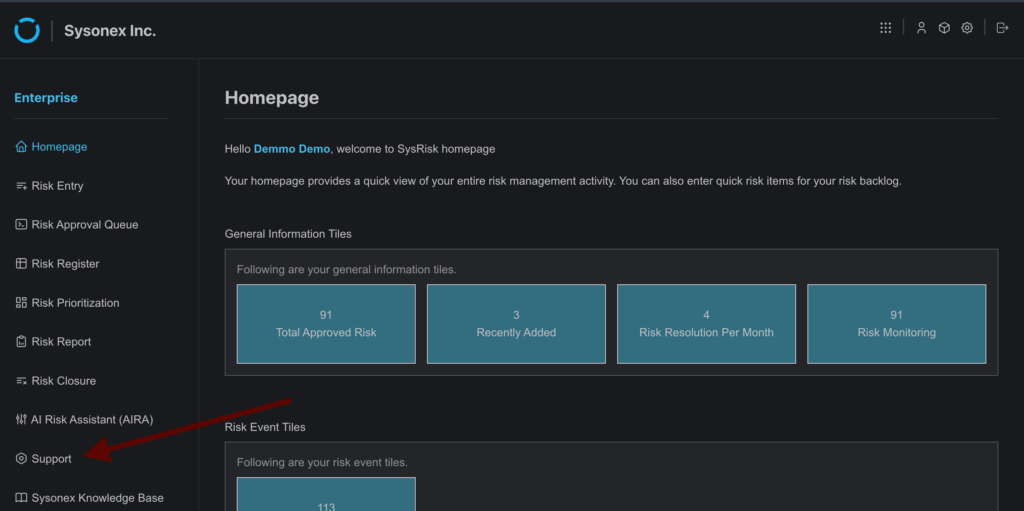
- Navigate to the Support Page
- Action: Once logged in, go to the Support page from the main menu.
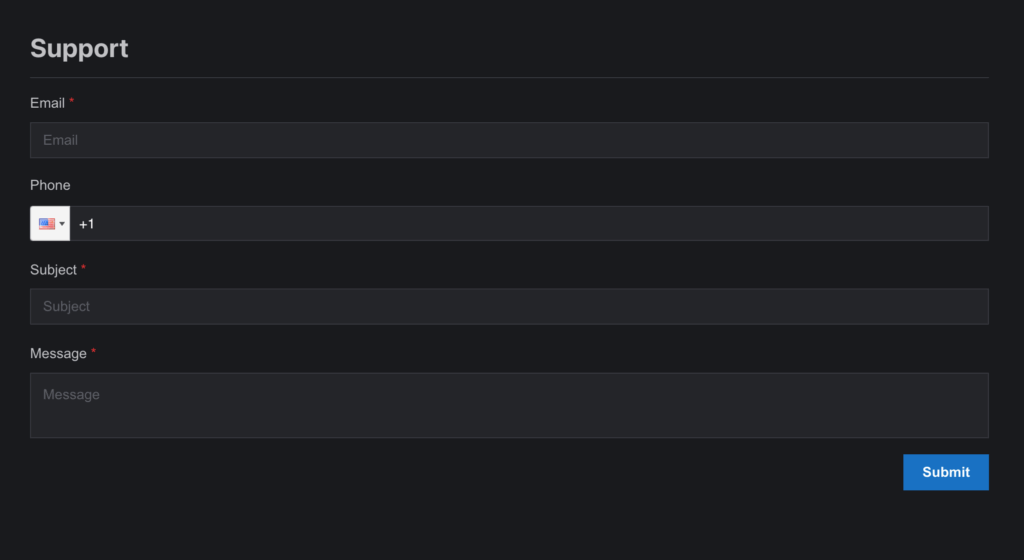
- Fill Out and Submit the Support Form
- Action: Complete the form available on the Support page with the relevant details of your query or issue, and click Submit.
- Purpose: This will send the query directly to the SysRisk Customer Success team for review and prompt action.
Key Features:
- Effortless Connection: No need to search for contact informationjust submit a request for support directly through the software.
- Time Efficient: Submitting queries is quick and simple, with a guaranteed response from the support team as soon as possible.
Additional Resource: Sysonex Knowledge Base
To learn more about SysRisk and related topics, users can also navigate to the Sysonex Knowledge Base page for comprehensive documentation and guides on using the software.